
| 일 | 월 | 화 | 수 | 목 | 금 | 토 |
|---|---|---|---|---|---|---|
| 1 | 2 | 3 | 4 | 5 | 6 | |
| 7 | 8 | 9 | 10 | 11 | 12 | 13 |
| 14 | 15 | 16 | 17 | 18 | 19 | 20 |
| 21 | 22 | 23 | 24 | 25 | 26 | 27 |
| 28 | 29 | 30 |
- 파일시스템
- display
- reactnavigation
- parser
- 함수형프로그래밍
- 챌린지
- 코딩테스트
- pandas
- Graph
- sql
- db
- flexbox
- 프로그래밍패러다임
- 부스트캠프
- ReactNative
- PYTHON
- 가상메모리
- CSS
- SQLD
- javascript
- OOP
- defaultdict
- 이벤트처리
- 베이직
- folium
- DFS
- 보안솔루션
- 단위테스트
- database
- BFS
- Today
- Total
DevLog
Flexbox 바로 알기(4) :: 'align-items' vs. 'align-self' vs. 'align-content' 본문
Flexbox 바로 알기(4) :: 'align-items' vs. 'align-self' vs. 'align-content'
김만콩 2023. 8. 5. 17:19처음 css 배울 때 이름이 비슷비슷해서 늘 헷갈렸던 세 가지 속성
`align-items`, `align-self`, `align-content` 한 눈에 비교하기!
align-items
내부 자식 요소들을 cross-axis(교차축)를 기준으로 정렬하는 flex 속성.
flex container (부모 엘리먼트)에 속성을 명시할 것!
Flexbox 바로 알기(2) - main axis와 cross axis 상에서 요소 위치 결정하기 :: justify-content, align-items, flex-di
Flexbox의 Main axis와 Cross axis flexbox는 주축(main axis)과 교차축(cross axis)을 기준으로 자식 요소의 위치 속성을 제어한다. 이때 default로 주축은 수평 방향, 교차축은 수직 방향을 나타내며, 각 방향에
mankkong.tistory.com
align-self
부모가 자식 요소의 속성을 결정하는 것이 아닌 실제 자식 요소의 위치를 직접적으로 수정할 수 있는 flex 속성.
align-items와 유사하지만 자식 요소 중 하나의 box에만 별개의 position 속성을 설정해줄 수 있다.
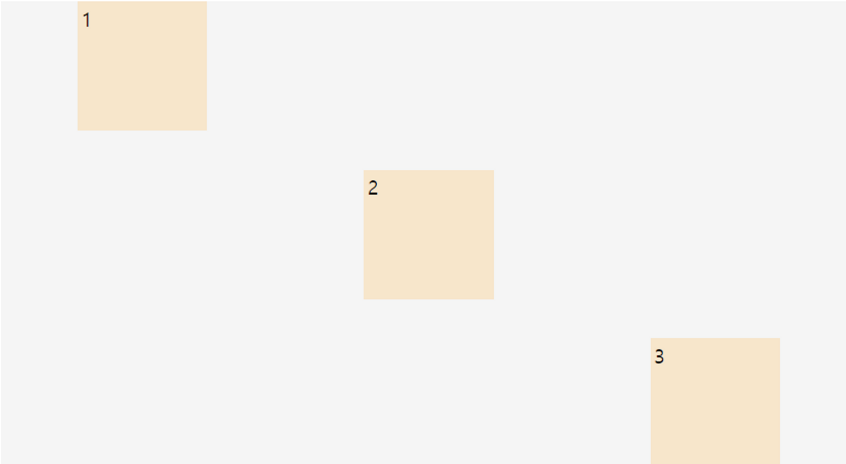
.container{
    background-color: whitesmoke;
    height: 50vh;
    display: flex;
    justify-content: space-around;
}

.child{
    background-color: bisque;
    width: 100px;
    height: 100px;
    padding: 3px;
}

.child:nth-child(2){
    align-self: center;
}

.child:nth-child(3){
    align-self: flex-end;
}
align-content
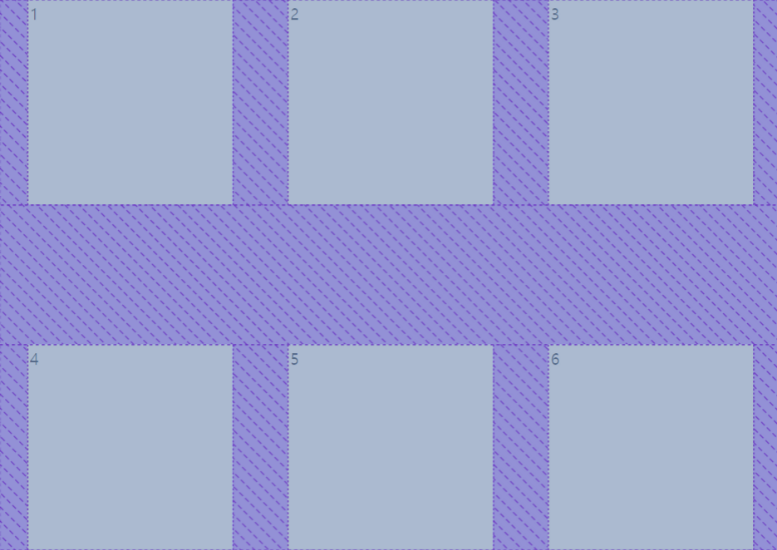
자식 아이템들이 여러 줄에 거쳐서 나올 때, 각 line 사이 간격을 조정하는 flex 속성.
이때 line 간격은 cross axis (사진 상에서는 세로축) 상에서 늘어나고 줄어든다.
`align-content: space-around;` ⇒ default 값
`align-content: start;` ⇒ 줄 간격 없이 맨 위로 붙여서 출력
`align-content: center;` ⇒ 줄 간격 없이 가운데로 모아서 출력
`align-content: space-between;` ⇒ 줄 간격 동일하게
align-items - CSS: Cascading Style Sheets | MDN
The CSS align-items property sets the align-self value on all direct children as a group. In Flexbox, it controls the alignment of items on the Cross Axis. In Grid Layout, it controls the alignment of items on the Block Axis within their grid area.
developer.mozilla.org
align-self - CSS: Cascading Style Sheets | MDN
The align-self CSS property overrides a grid or flex item's align-items value. In Grid, it aligns the item inside the grid area. In Flexbox, it aligns the item on the cross axis.
developer.mozilla.org
align-content - CSS: Cascading Style Sheets | MDN
The CSS align-content property sets the distribution of space between and around content items along a flexbox's cross-axis or a grid's block axis.
developer.mozilla.org

